Less retyping after hours
Capture readings, photos, findings, and signatures once — inside the job record.
FieldLoom turns inspections into photo-rich reports, clean estimates, customer approvals, and payments — before you leave the job site.
See how FieldLoom works
Why FieldLoom exists
Capture readings, photos, findings, and signatures once — inside the job record.
Send clean branded PDFs instead of messy texts, scattered camera roll photos, or handwritten notes.
Turn findings into estimates, get approval, and collect payment while the problem is fresh.
The FieldLoom flow
Simple enough for a solo tech. Powerful enough for a growing shop.
HVAC checklists, readings, pass/fail items, and findings in one guided flow.
Add photos, labels, arrows, before/after shots, and notes tied to each finding.
Generate a branded PDF with readings, photos, recommendations, and customer signature.
Create estimates and invoices, send them by text/email, and track approvals.
HVAC-first tools
FieldLoom starts with the HVAC workflows solo operators and small shops need every day.
AI copilot for HVAC professionals
Three AI tools solo techs use on every call, live in FieldLoom today. Each one runs on-device with Apple Intelligence first and falls back to the cloud only when the phone can’t do it. Superheat, subcooling and every number on the report still come from FieldLoom’s HVAC engine, never from a language model.
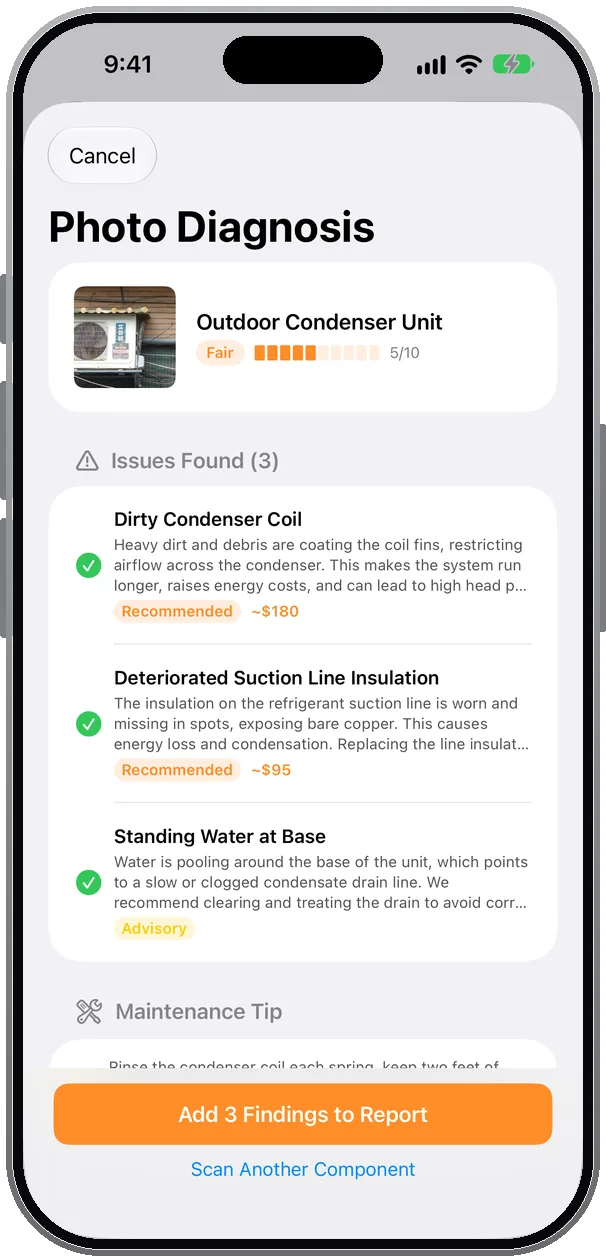
Photograph a condenser, contactor, capacitor or coil. The copilot names the component, scores its condition 1–10, lists each visible issue and drafts a finding with an estimated repair cost.
How techs use it: tick the issues you agree with. Each becomes a finding in the job with the photo attached, priced, and ready for the report and the estimate.
On-device first · cloud fallback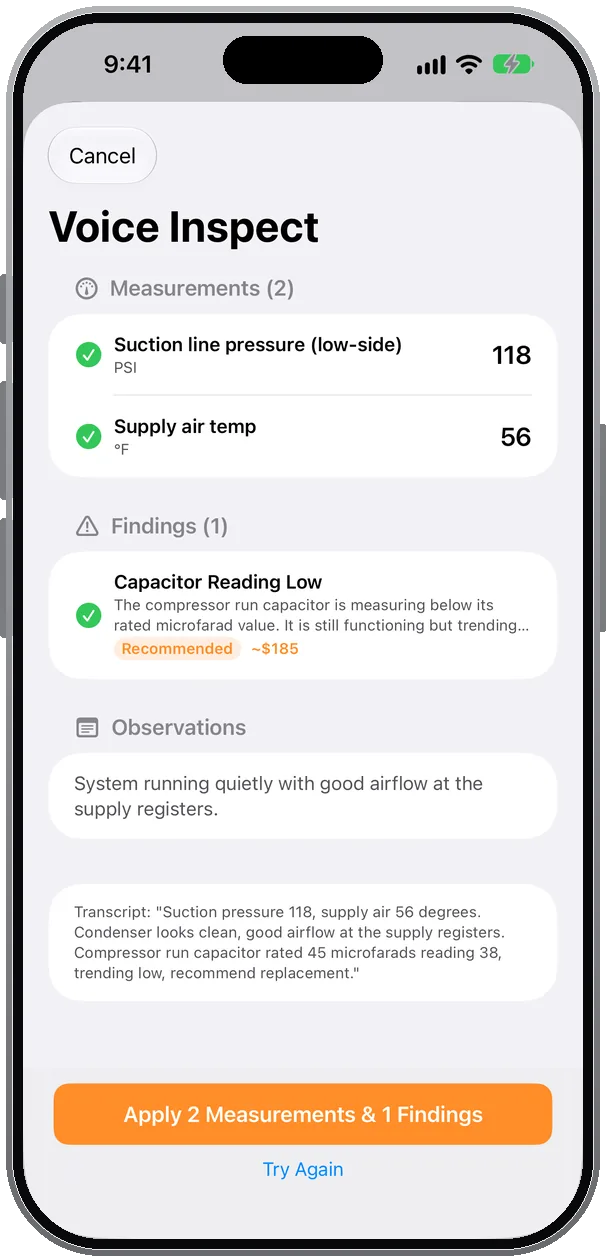
Keep your hands on the equipment and talk: “suction 118, supply air 56, run capacitor rated 45 reading 38.” On-device speech recognition transcribes it and the model sorts it into readings, findings and observations.
How techs use it: readings land in the right checklist rows, findings arrive with urgency and cost, and you review every line before anything is saved.
On-device speech + model · cloud fallback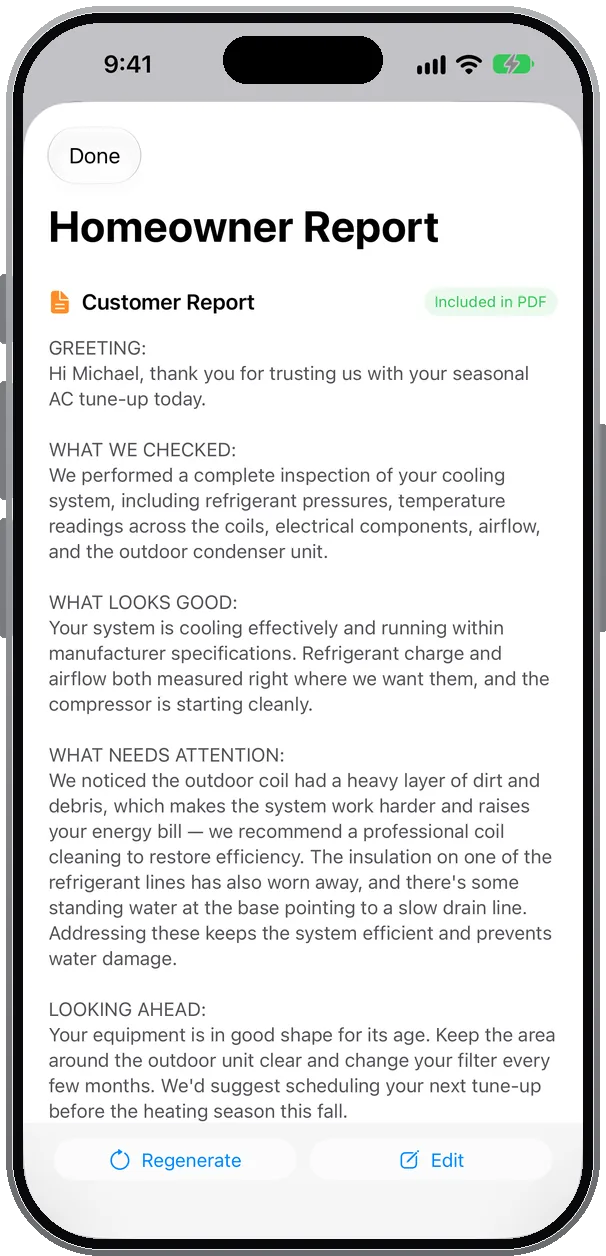
One tap turns readings, findings and photos into a plain-English page addressed to the customer: what we checked, what looks good, what needs attention. Apple Writing Tools are built into every notes field, so you can proofread, rewrite or make a finding sound more professional before it ships.
How techs use it: edit or regenerate, then it prints as its own page in the branded PDF, in English or Spanish, with the executive summary written the same way.
On-device first · cloud fallback60-second demonstration
 1. Open AI Tools
Seven tools live on every job, next to the checklist.
1. Open AI Tools
Seven tools live on every job, next to the checklist.
 2. Talk through the unit
Narrate readings and what you see. Hands stay on the gauges.
2. Talk through the unit
Narrate readings and what you see. Hands stay on the gauges.
 3. Check the health score
Readings, trend since last visit and age roll into one call: monitor, maintain, repair or replace.
3. Check the health score
Readings, trend since last visit and age roll into one call: monitor, maintain, repair or replace.
 4. Send the report
Findings, photos, costs and the homeowner page land in the PDF. Signed in the driveway.
4. Send the report
Findings, photos, costs and the homeowner page land in the PDF. Signed in the driveway.
See all twelve AI tools, including Listen for Issues, Smart Pricing and Predict Parts →
Limited Austin beta
We’re inviting the first 1,000 solo HVAC pros to shape FieldLoom. You get FieldLoom Solo free for 6 months after your seat is activated, in exchange for one short check-in around month three.
Meet the Founding Pros
See all Founding Pros →Simple pricing
Everything you need to inspect, quote, and get paid — from the job site.
Solo: your first month is free through the App Store — nothing is charged until the month ends, cancel anytime in Settings. Founding Pro: approved applicants pay nothing for 6 months, then $24.99/mo for as long as they stay subscribed.
Founder-led
I’ve built mobile apps for years, but FieldLoom is being shaped directly with local HVAC pros. The goal is simple: a field tool that feels fast, practical, and made for the way techs actually work.
hello@fieldloom.ioFounding Pro application
No credit card. No required call. Share your contact details and we’ll follow up within 48 hours.
No credit card. Choose whether you’d like a demo call; it’s optional.
Questions
FieldLoom helps HVAC pros complete inspections, document findings with photos, auto-calculate readings, generate branded PDF reports, create estimates, and send invoices from the job site.
Yes. Approved applicants get FieldLoom Solo free for 6 months after their seat is activated, with no credit card required. Seats open in batches of 100, so apply early. Automated customer texts and emails aren’t included on Founding seats; they go through your phone’s Messages and Mail apps.
Yes. Inspections, notes, photos, and report generation are designed to work offline and sync when signal returns.
Starting local makes it easier to meet HVAC pros, observe real workflows, and improve the app quickly before expanding.
FieldLoom runs on iPhone and iPad (iOS 18+).